
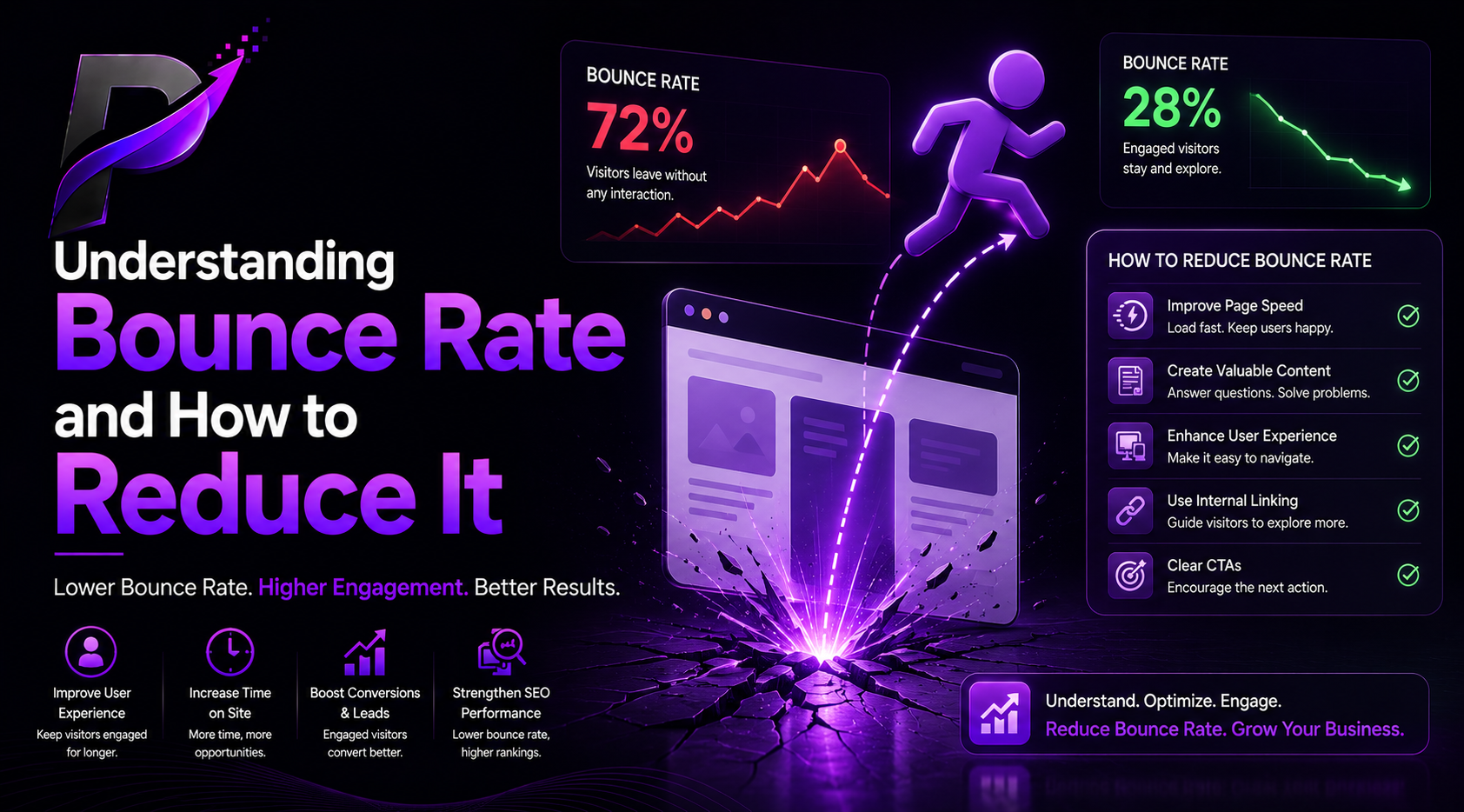
When people visit a website, businesses hope they will explore multiple pages, read content, contact the company, or make a purchase. However, many visitors leave after viewing only one page without taking any further action. This behavior is known as a bounce.
Bounce rate is one of the most important website performance metrics because it helps businesses understand whether visitors are finding content useful and engaging. A high bounce rate does not always indicate a problem, but consistently high bounce rates can signal issues with website design, content quality, user experience, or traffic sources.
Understanding bounce rate and learning how to reduce it can help businesses improve engagement, increase conversions, and create better user experiences.
What Is Bounce Rate?
Bounce rate refers to the percentage of visitors who leave a website after viewing only one page without interacting further.
For example:
- A visitor opens a blog post.
- Reads for a few seconds.
- Leaves without visiting another page.
This counts as a bounce.
If 100 people visit a website and 60 leave after viewing only one page, the bounce rate is:
A lower bounce rate often indicates that visitors are engaging with content and exploring additional pages.
Why Bounce Rate Matters
Bounce rate helps businesses understand visitor behavior.
A high bounce rate may indicate:
- Poor user experience
- Slow website speed
- Irrelevant content
- Weak design
- Confusing navigation
- Mismatched visitor expectations
When visitors leave quickly, businesses lose opportunities to generate leads, sales, and engagement.
Monitoring bounce rate helps identify areas for improvement.
Common Reasons for High Bounce Rates
Slow Website Loading Speed
Modern users expect fast websites.
If pages take too long to load, visitors often leave before content appears.
Common causes include:
- Large images
- Poor hosting
- Excessive scripts
- Unoptimized code
Website speed directly affects user satisfaction.
Poor Mobile Experience
Many visitors access websites through smartphones.
Problems such as:
- Small text
- Difficult navigation
- Slow performance
- Broken layouts
can increase bounce rates significantly.
A mobile-friendly website keeps users engaged longer.
Misleading Titles and Descriptions
Sometimes users click a page expecting one thing but find something completely different.
Examples:
- Clickbait headlines
- Misleading advertisements
- Irrelevant keywords
When expectations are not met, visitors leave immediately.
Content should match user intent.
Weak Content Quality
Visitors want useful information.
Poor content often includes:
- Lack of detail
- Outdated information
- Difficult readability
- Poor formatting
Helpful and valuable content encourages users to continue exploring.
Confusing Navigation
Users should easily find what they need.
Poor navigation creates frustration.
Examples include:
- Complicated menus
- Broken links
- Hidden information
- Cluttered layouts
Simple navigation improves user experience.
How to Reduce Bounce Rate
Improve Website Speed
Fast websites create better experiences.
Businesses should:
- Compress images
- Use quality hosting
- Minimize unnecessary scripts
- Optimize page performance
Even small improvements can increase engagement.
Create High-Quality Content
Content should:
- Solve problems
- Answer questions
- Provide value
- Be easy to read
Use headings, bullet points, and clear formatting.
Helpful content encourages visitors to stay longer.
Improve Mobile Optimization
A responsive website adapts to different screen sizes.
Important factors include:
- Readable text
- Fast loading pages
- Touch-friendly buttons
- Easy navigation
Mobile users expect smooth experiences.
Use Internal Links
Internal links encourage visitors to explore additional content.
Examples:
- Related blog posts
- Service pages
- Case studies
- Guides
Internal linking increases page views and improves engagement.
Add Clear Calls-to-Action
Visitors should know what to do next.
Examples:
- Contact Us
- Learn More
- Request a Quote
- Read Related Articles
Strong calls-to-action guide users through the website.
Is a High Bounce Rate Always Bad?
Not necessarily.
Some pages naturally have higher bounce rates.
Examples:
- Blog posts
- News articles
- Contact pages
- FAQ pages
If visitors find the information they need quickly, they may leave satisfied.
Businesses should analyze bounce rate alongside other metrics such as:
- Time on page
- Conversions
- User engagement
- Returning visitors
Context matters.
Conclusion
Bounce rate is an important metric that helps businesses understand visitor engagement. High bounce rates can result from slow loading speeds, poor user experiences, weak content, or confusing navigation. By improving website performance, content quality, and user experience, businesses can encourage visitors to stay longer and interact more with their websites.
Many website owners spend months trying to get more traffic while ignoring the fact that visitors are escaping faster than guests discovering there are no snacks at a party. Keeping attention is often just as important as attracting it.
Leave a Reply